What Is the Clay Art Style?
(And How to Make Your Own)
You've definitely seen it, even if you didn't know what to call it: the rounded, slightly puffed-up look that makes a character seem like it was sculpted from soft, colorful clay. It shows up everywhere — app icons, social media posts, game art, stickers. The clay art style has become one of the signature aesthetics of contemporary digital design.
This post covers where it came from, what makes it visually distinct, why it's so popular right now, and how you can create your own clay-style art without any 3D software skills.
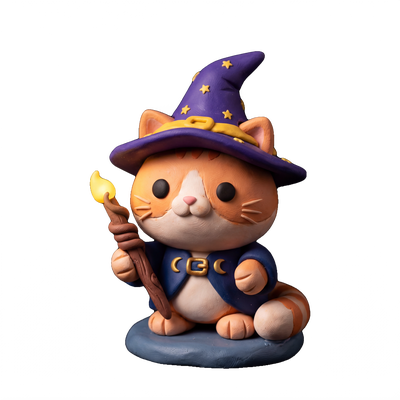
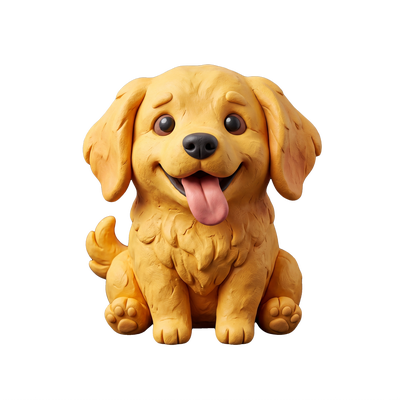
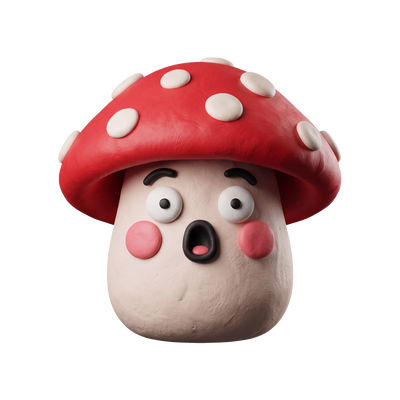
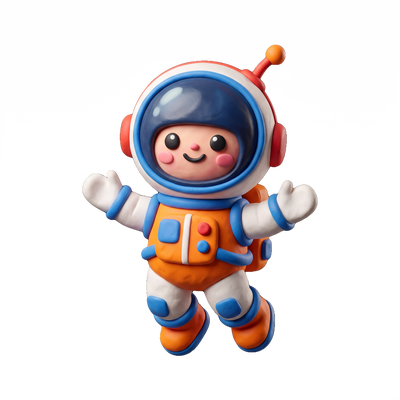
What clay-style art actually is
Clay-style art is a visual aesthetic where subjects are rendered to look like three-dimensional objects made of clay or plasticine. The defining visual characteristics are:
Rounded, bulbous forms
Sharp edges and flat planes are replaced with soft, swollen curves. A clay-style frog doesn't have a flat back — it has a gentle dome. Everything feels slightly inflated, like it was modeled by hand.
Matte, slightly textured surfaces
Unlike glossy plastic or shiny metal renders, clay style uses subdued, soft-diffuse lighting. The surfaces look tactile — like you could actually press a fingerprint into them.
A small specular highlight
There's usually one soft, off-center highlight on rounded surfaces (especially heads and eyes). This catches the light the way real clay does, giving the illusion of depth without looking metallic.
Simple, expressive features
Clay-style characters tend to have simplified anatomy — big dot eyes, small curved mouths, stubby limbs. The simplification is part of the aesthetic, making characters immediately legible at any size.
Saturated but soft colors
The color palette is vibrant but not garish. Think muted pastels pushed slightly toward saturation — the colors of play dough rather than neon paint.
Where it came from
The roots of clay art go back to actual clay — specifically to the long tradition of claymation animation. Claymation (stop-motion animation using clay figures) dates to the early 20th century, but it became culturally embedded through beloved franchises: Gumby in the 1950s, Wallace and Gromitand Chicken Run by Aardman Animations, and the California Raisins commercials in the 1980s. These gave clay characters their foundational look — rounded, handmade, slightly imperfect.
The digital clay aesthetic emerged separately from 3D computer graphics. As 3D software became more accessible in the 2010s — particularly Blender, which went free and open-source and received a major interface overhaul in 2019 — more independent artists started experimenting with stylized 3D rendering. The “clay render” look became a popular Blender technique: using simple, matte materials and soft ambient lighting to make 3D objects look like clay sculptures rather than realistic objects.
From there it spread through design-sharing communities on Dribbble, Behance, and Instagram. App icon designers picked it up for iOS and Android icon packs. Game artists used it for casual mobile games where the soft, approachable look fit the tone. By the early 2020s, it had become recognizable enough to have a name: the clay art style, or sometimes the “3D clay aesthetic.”
Why the clay style has stayed popular
A lot of visual trends burn bright and fade fast. The clay style has been prominent for several years now without showing obvious signs of exhaustion. A few reasons for that:
- →It reads universally. The rounded, toy-like quality appeals across age groups and cultures. It doesn't feel tied to a specific subculture or era the way, say, flat design or skeuomorphism does.
- →It's tactile in a digital world. There's something satisfying about something that looks like you could touch it — squeeze it, poke it. On a touchscreen, that sensory implication is especially appealing.
- →It works at small sizes. Clay characters with simple features and clear silhouettes remain legible as tiny stickers or small app icons. This makes them practical for messaging, where stickers appear at maybe 60x60 pixels.
- →It photographs well. Against any background — white, dark, colorful — clay-style art holds up because of the soft drop shadow and strong silhouette. It never looks washed out or invisible.
Clay style vs. similar aesthetics
People sometimes confuse clay style with other nearby 3D aesthetics. Here's how they differ:
Clay style vs. chibi
Chibi is a 2D anime art style featuring oversized heads and tiny bodies. Clay style is specifically 3D — the defining quality is the sculptural, tactile surface. They often share simplified features and cute proportions, but chibi is flat while clay style has depth.
Clay style vs. low-poly
Low-poly art uses flat polygonal surfaces with sharp angles, giving a faceted, geometric look. Clay style is the opposite — everything is smooth, rounded, and organic.
Clay style vs. cartoon 3D
General "cartoon 3D" can use plastic-like shiny surfaces, cel shading, or a variety of stylized looks. Clay style specifically implies the matte, soft-diffuse look of real clay — the surface treatment is the differentiator.
How to make your own clay-style stickers
Until recently, making clay-style art meant either learning 3D software (Blender, Cinema 4D) or commissioning a 3D artist. Both options put it out of reach for most people who just want a fun sticker.
AI image generation has changed this completely. Modern AI models can produce convincing clay-style art from a text prompt — no 3D skills required. The key is knowing how to prompt for it.
StickerForge is purpose-built for this: it's an AI sticker generator trained specifically to produce clay-style output. Every generation uses the clay aesthetic by default, so you don't need to figure out the right prompt modifiers — just describe what you want.
Example prompts that work well:
Each generation produces four variations. The stickers have transparent backgrounds and are ready to drop into iMessage, WhatsApp, Discord, or anywhere else you use messaging apps.
Try the clay style for yourself
Free to start. Works in your browser. No 3D skills required.
Make clay stickers on StickerForge →Related